You Can Now Run a Full Teleprompter Without Buying a Teleprompter

Elgato just made the software half of teleprompting free and hardware-independent. That is good news, and it makes the case for a display mount stronger, not weaker.
For years, using a teleprompter meant buying a teleprompter: a beamsplitter, a small display, a stand, and a place on your desk to put all of it. Elgato has been quietly dismantling that assumption. Elgato Studio 2.0, currently in public beta, lets you write, manage, and run scripts with no Prompter hardware required, with a rebuilt Voice Sync engine that scrolls your script as you speak, read-text highlighting, chapter markers, timers, and an operator preview that mirrors the script on your main monitor in real time.
Read that again, because it is the whole story: the script now lives on the screen you already own.
What this changes
The teleprompter has always been two things bolted together. One is software, the thing that holds your script and moves it at the speed you talk. The other is optics, the beamsplitter trick that hides a lens behind the words so your eyes appear to meet the camera.
Software prompting on your own display gives you the first half at no cost. You get your script, in front of you, scrolling with your voice, on a bright full-size monitor rather than a small dim panel viewed through glass. What it cannot give you is the second half. A script rendered on your screen does not move your webcam. If the camera is still perched on the top bezel while you read text in the middle of the display, you are reading at one place and being photographed from another, which is the exact problem prompters were invented to solve.
This is where the two halves come back together, and it costs a great deal less than $500.

The setup
Here is the whole workflow, and it takes about two minutes to build.
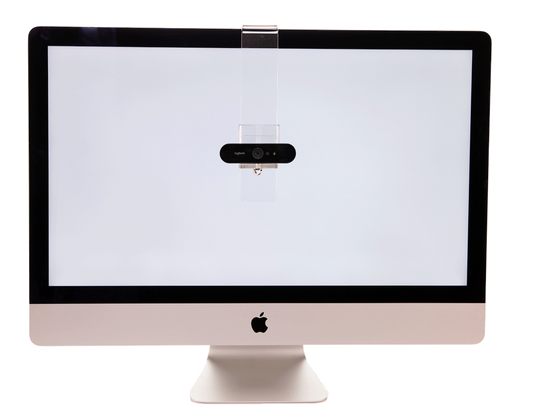
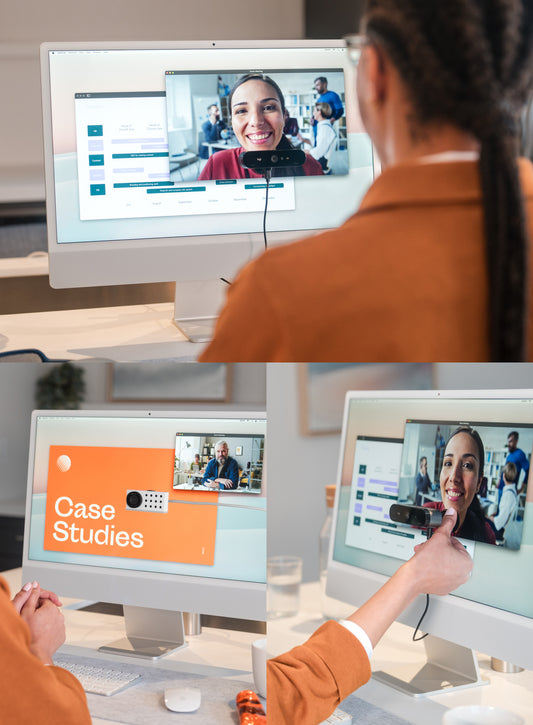
Install the prompter software and load your script. Position the prompter window where you want to read, and if you are also on a call, put your meeting window beside or beneath it so the faces and the words sit close together. Then mount your webcam on the Mag2 and place it at the top of the reading line, right where your eyes will rest as you deliver the first sentence of each paragraph. Not above the monitor. On the glass, at the words.
Now start talking. Your gaze tracks the script, the lens sits where your gaze is, and your audience sees a person looking directly at them while reading fluently. That is a full prompting workflow with no beamsplitter, no desk stand, no second display, and nothing to assemble.
Why the mount is the part you cannot skip
Prompter software can draw a marker on your screen showing where a camera ought to be. It cannot put one there. That is a physical problem, and it has a physical answer.
The PlexiCam Mag2 is a display-safe magnetic mount that holds a USB-C webcam anywhere on your monitor or laptop screen. Three ounces, no tools, no adhesives, and it moves in seconds when your layout changes. Put the camera where the script is today, slide it when tomorrow's window sits somewhere else.

It also solves a problem the all-in-one prompter creates. A beamsplitter rig asks you to read through glass on a small, comparatively dim panel. Every professional monitor sold today is brighter, larger, and sharper than the display inside a desktop prompter. Running your script on your own screen is not a compromise. For most people it is an upgrade.
The honest comparison
A dedicated prompter still wins in specific situations. Long-form scripted delivery to a DSLR or mirrorless camera, studio shoots where an operator drives the script, and anywhere the talent needs to read for an hour without deviating benefit from real prompter hardware with its own optics and controls.
But the work most professionals actually do, delivering a quarterly update, running a webinar, recording a product walkthrough, taking a client call with talking points in view, is served completely by script software on your screen and a camera in the right place. The bundle price for that is the cost of a mount.
Try it and tell us what happens
Elgato Studio 2.0 is in public beta on Windows with a macOS version in progress. It works whether or not you own any Elgato hardware, and it works with the webcam you already have. Pair it with a Mag2, put the lens on the reading line, and you have a prompting setup that would have cost several hundred dollars and a good chunk of your desk two years ago.
We are not affiliated with Elgato, and we are happy to say they built something genuinely useful here. It just happens that the more prompting moves into software, the more the remaining problem is the one we solve.
See how a Mag2 setup compares with the Conferencing Kit+, or read our eleven rules for choosing a webcam setup.
Elgato Studio 2.0 beta features described from Elgato's published changelogs and product pages as of September 2026. Elgato is a trademark of its owner; PlexiCam is not affiliated with Elgato or Corsair. Beta software changes frequently, so check Elgato's release notes for current functionality and platform support.