Eleven Rules for Buying a Webcam Setup You Won't Regret

Eleven rules we'd give a friend who asked what to buy. We make a mount, so we have a stake in some of these. We've marked where that's true, and every rule here would be worth following even if we sold nothing at all.
Buying a webcam setup looks simple until you're three tabs deep in resolution numbers, AI features, and mounting gimmicks, at which point most people give up and buy whatever has the most reviews. That's how professionals end up on calls looking like they're broadcasting from a submarine.
Here is the shortlist we'd hand a colleague. Some of these rules are about image quality. Most are about the far more common failure: gear that works fine in a product photo and quietly makes your daily working life worse.
Rule 1: No hardwired cables
If the cable is permanently attached to the camera and the cable fails, you don't have a cable problem. You have a paperweight. Cables are the single most failure-prone part of any desk setup, because they get yanked, rolled over by chair casters, bent at the connector, and packed and unpacked hundreds of times. A detachable cable is a $12 replacement. A hardwired one takes the camera with it.
Rule 2: Nothing below 1080p
720p died a decade ago. It survives in cheap webcams because the number still looks like a spec. Full HD is the floor for anyone whose face is part of their job. You may not strictly need 4K, but the premium is small now and it buys you cropping room, better downscaled detail, and a setup that still looks current in three years. Call it low-cost future-proofing.
Rule 3: No focusing by hand
If you have to twist a ring to get sharp, you have added a step to every session where your distance from the screen changes, which is every session. Autofocus is standard, it works, and manual focus on a webcam is a cost-cutting measure dressed up as a feature.
Rule 4: Discount the AI tracking gimmicks
Auto-follow demos beautifully. You wave, the frame glides after you, everyone in the room says wow. Then you use it in a real meeting, where you lean toward your notes and the entire frame drifts with you, and your viewers get seasick. A handful of people who present standing up genuinely need it. Almost nobody else does, and fewer still use it well. Buy the camera for its sensor, not its choreography.
Rule 5: AI eye-contact correction is a hack, and an ugly one
Software that digitally rotates your pupils toward the lens can technically be done, and you can technically tell. Eyes glitch at the edges. More damaging, your gaze stops agreeing with your head and body: your eyes point at the viewer while everything else in your posture points somewhere else. People may not consciously identify what's wrong, but they register that something is off, which is the precise opposite of what you wanted from eye contact.
While we're here: a lens smaller than a nickel will not give you the image your phone gives you, no matter what the box says. Physics gets a vote, and it votes for sensor size.
Rule 6: Beware the camera on a stick
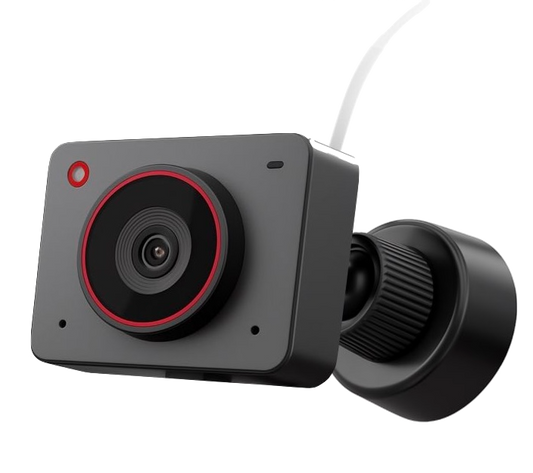
A tiny camera at the end of a wire, a gooseneck, or an armored flexible cable violates Rule 1 outright, since that cable is almost always hardwired. It also ties your framing to the mechanical stability of the thing it hangs from. Bump the desk and your shot wobbles. Reposition it a few dozen times and the cable develops a memory, always rolling a few degrees left or right of where you put it. Your framing becomes a daily negotiation.
Rule 7: Get the camera within an inch or two of your eye line
This is the rule that changes how you look more than any spec on the box. Too low and you are shooting up: nostrils, neck, and the impression that you are looming over the viewer. Too high and you are shooting down: forehead, a shrinking posture, the visual grammar of someone being talked down to. Neither reads as confident. Within an inch or two of your actual eye height, the geometry disappears and people just see your face.
Rule 8: USB-C by default, USB-A as the backup plan
USB-C is where every laptop, dock, and hub is going, and it carries the bandwidth a high-resolution camera actually wants. Buy USB-C, and keep an adapter in the bag for the conference room podium that still has a blue port. Choosing USB-A as your primary connection in 2026 is buying into a slow farewell.
Rule 9: No proprietary software required
Plug and play, or plug and pray. Any camera that needs a vendor utility to reach its normal functions has made your setup dependent on that vendor's willingness to keep supporting your operating system, your CPU architecture, your USB hub, and your video platform. Drivers rot. Companies pivot. A camera your machine simply recognizes will still work on a laptop you haven't bought yet.
Rule 10: Give up no desk space
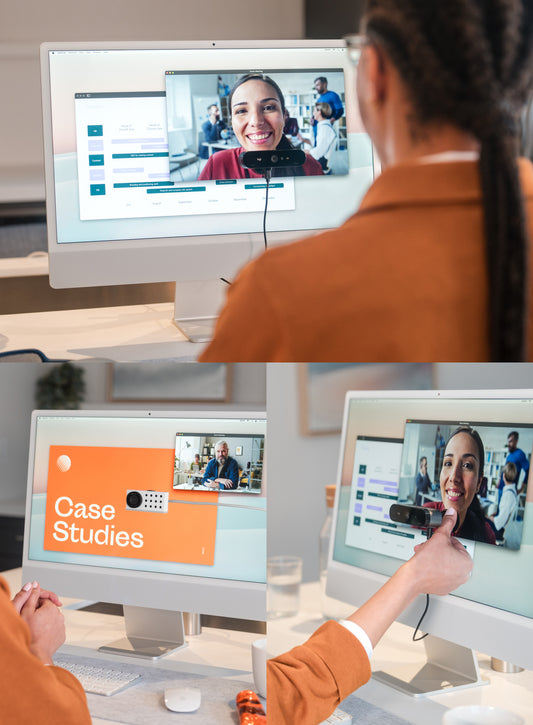
Home offices and cubicles are small. Every square inch is contested by a keyboard, a mouse, a laptop, a phone, a notepad, a coffee, and whatever else earns its place. A camera setup that claims a footprint on the desk is charging you rent in the scarcest real estate you own. The screen, by contrast, is space you have already paid for and cannot fill.
Rule 11: It should get out of the way, and come back
Most of your workday is not on camera. When you're heads-down, the camera should be able to move aside without being disassembled, and return to the same position without a fresh round of fiddling. This is where fixed arms and mic-stand-style rigs wear thin: they are always in your face, or always in your way, and putting them back means re-finding your framing every time.

Where we come out
Nine of these eleven rules are about the camera itself, and you can satisfy every one of them without buying anything from us. Pick a detachable-cable, autofocusing, plug-and-play USB-C camera at 1080p or better, ignore the tracking gimmicks, and you have made a good decision.
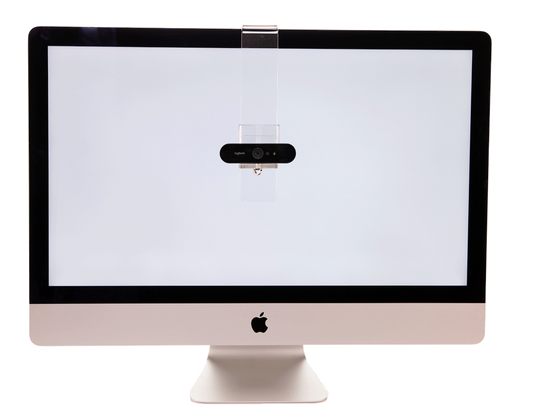
The last three, position and desk space and getting out of the way, are the ones that sent us into this business. They are also the ones almost nobody solves when they buy a camera, because they are properties of the mount, not the sensor. Our answer is the PlexiCam Mag2: a display-safe magnetic mount that holds the USB-C camera you chose anywhere on your screen, at your eye line, using no desk space, and moves in seconds when you want it gone.
Whatever you end up buying, buy the rules first and the brand second.
More on why camera choice matters for professionals, or see how the Mag2 compares to integrated eye-contact cameras and teleprompter rigs.
Camera brands referenced are trademarks of their respective owners. PlexiCam manufactures webcam mounts and has a commercial interest in Rules 6, 10, and 11.