The $500 Teleprompter Rig and the 3-Ounce Mount: What Eye Contact Actually Requires

The biggest name in creator hardware just spent serious money proving what we've been saying since 2020. Here's what they got right, and what they overbuilt.
In June, Elgato, the Corsair-owned company behind much of the streaming world's gear, launched a $499.99 bundle called the Conferencing Kit+. It combines a teleprompter display, a webcam, a desk stand, a laptop stand with a built-in USB hub, and the cabling and software to run your video calls through all of it. Their marketing makes a pointed argument: better webcams alone cannot fix eye contact on video calls, and professional advancement increasingly depends on fixing it.
They're right. And it's worth pausing on how remarkable that is. A major hardware brand is now telling millions of professionals that the camera perched on top of your monitor, no matter how sharp its sensor, makes you look disengaged, because you're looking at the people on your screen while the camera watches you from somewhere else. Eye contact on video isn't a talent problem or a webcam-quality problem. It's a geometry problem. The camera has to sit where the eyes are.
We've built our entire company on that insight. So consider this less a rebuttal than a friendly disagreement about the solution.
What the teleprompter approach buys you, and what it costs
The teleprompter architecture works like this: your call is piped onto a small display that sits in front of a beamsplitter, and the camera films you through it. You look at the prompter, the camera sees you head-on, and eye contact is achieved. It's the same technique news anchors have used for decades, and for reading scripts to camera, it's genuinely the right tool.
But look at what arrives in the box: a prompter unit, a dedicated webcam, a desk stand that clamps to your desk, a laptop stand, cable ties, and an Allen key. That last item tells you everything. This is equipment you assemble, position, and leave in place. It solves eye contact at one desk: the desk you bolted it to. Travel to a client's office, a hotel room, or a conference green room, and your professional presence stays home.
There's also a cost you don't see on the spec sheet: you stop looking at your monitor. The teleprompter architecture requires your call to run on the prompter's own small display, viewed through beamsplitter glass, and that glass takes a toll. All but the most professional broadcast prompters are noticeably dimmer than the monitor already on your desk, which today is likely a bright, color-accurate panel measured in hundreds of nits. So the trade is real: you give up the large, crisp screen you chose for a smaller, darker reflection of it, and you squint at your own meeting all day to get eye contact. That's not an upgrade to your workspace. It's a downgrade with one feature.
And it all amounts to building a second setup, a small studio, on top of the one you already own. You have a monitor. Most professionals have a webcam they like, or can pick a great one. The prompter path asks you to buy a parallel display, a captive camera, and dedicated stands, then rearrange your desk around them. The question worth asking before spending $500 is simple: what if the hardware you already have is one small part away from solving this?
For a full-time streamer with a permanent studio, these trade-offs can make sense. For the executive, seller, or founder who works from three different places in a given week, on a monitor they already love, it's solving a portable problem with immovable hardware, and a bright-screen problem with a dim one.
The three-inch alternative
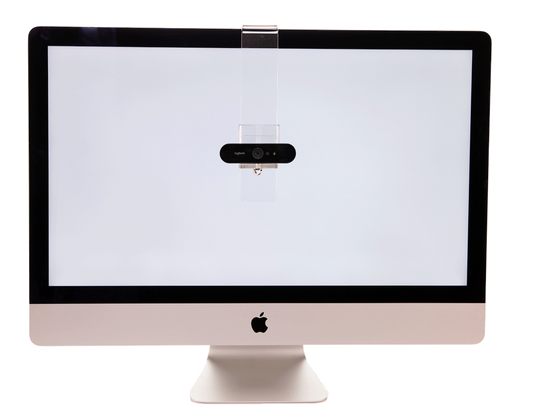
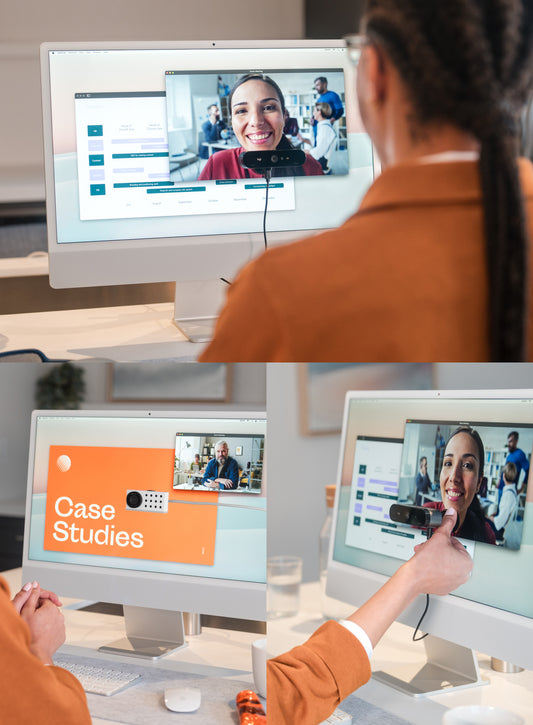
Here's the thing about the geometry problem: the distance between "looking past someone" and "looking at them" is about three inches. The camera doesn't need to hide behind a beamsplitter. It just needs to sit on your screen, directly over the faces in your meeting window.

That's what the PlexiCam Mag2 does. It's a display-safe magnetic mount, three ounces, that holds your USB-C webcam anywhere on your monitor or laptop screen: no clamps, no stands, no tools, no desk space. It attaches in seconds, adjusts with one hand, and packs into a hard shell case when you leave. Nothing about your setup changes: you keep looking at the monitor you chose, at its full size and full brightness, and you keep using the webcam you already own. The only thing that moves is the camera: three inches, to eye level, over the eyes you're actually looking at. No second display, no captive hardware, no studio built on top of your desk.
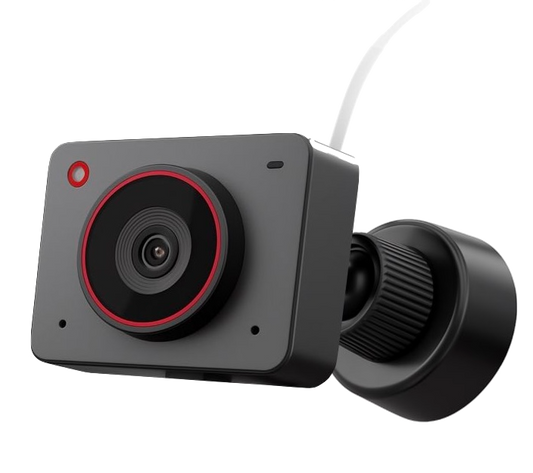
The price difference is not subtle. The Mag2 mount is $139. Pair it with an OBSBOT Meet SE HD webcam (the Mag2 Plus bundle) and a complete eye-contact setup, camera included, is $199. The Conferencing Kit+ is $499.99. Both put a Full HD camera at eye level. One of them also fits in your laptop bag.
The benefits, side by side
| PlexiCam Mag2 | Teleprompter rig | |
|---|---|---|
| Price, camera included | $199 ($139 mount alone) | $499.99 |
| What you look at all day | Your own monitor, full size and full brightness | A smaller display viewed through beamsplitter glass |
| Uses your existing hardware | Yes: your monitor and your choice of USB-C webcam | No: parallel display, captive camera, dedicated stands |
| Desk space | Zero, it lives on your screen | Desk stand plus laptop stand footprint |
| Setup | Magnetic, tool-free, seconds | Multi-step assembly, Allen key included |
| Travels with you | 3 oz, hard shell case included | Built to stay on one desk |
An honest accounting
Is there anything the teleprompter rig does that a display mount doesn't? Yes: if you read long scripts verbatim to camera (political spots, formal announcements, anchor-style delivery), a true prompter earns its desk space. And Elgato's Airtime software routing has real appeal for streamers already living in their ecosystem.
But for the work most professionals actually do on video (meetings, sales calls, interviews, board presentations), the prompter is architecture in search of a problem the mount already solved. You don't need your call displayed behind a beamsplitter. You need your camera over the call. Everything else in that $500 box is weight.
The category just got validated. Choose your side of it.
The real significance of Elgato's launch isn't the hardware. It's the reframing: video presence is no longer a webcam-accessory afterthought; it's a professional competency, with a market forming around it. When a company that size spends its brand equity teaching your next client that eye contact matters, the question stops being whether to fix your setup and becomes how.
Our answer: with the smallest, simplest thing that solves the actual problem. Three ounces, three inches, thirty seconds.
See the full side-by-side comparison of the Mag2 Plus and the Elgato Conferencing Kit+, or go straight to the Mag2 mount ($139) and the Mag2 Plus bundle with HD webcam ($199).
Elgato Conferencing Kit+ contents and list price from elgato.com as of August 2026. Elgato is a trademark of its owner; PlexiCam is not affiliated with Elgato or Corsair.